
Zillow Messages in Follow Up Boss helps boost buyer engagement for Zillow leads. This is an “app-to-app” messaging platform that streamlines communications and is a foundational feature of the integrated transaction experience. When you send a Zillow Message in FUB, the buyer receives your message within their Zillow App, and they also get a text notification from Zillow with your message. They can reply to your message from Zillow or by replying directly to the text.
Note: To access this feature, team leads need to enable Zillow 2-Way Integration, and team members need to link their Zillow profile to FUB.
Send a Zillow Message after receiving a connection
After receiving a Zillow connection (from tour requests or property inquiries), you will be able to send a Zillow Message once your appointment has been confirmed by clicking on “Contact in Follow Up Boss” (screen 1), which opens that contact’s page on the FUB mobile app.
From there, you click on the Zillow Message that will show up at the top of the lead profile page with the Zillow logo and “Zillow Messages” label (screen 2). Open that message to send a response (screen 3), you can search for a template by clicking on the bottom left corner “pages” icon, and select a template (screen 4), then continue to send as your first message to the buyer (screen 5).
FUB owners and admins can add an initial message to the lead flow rules to automatically send the RTT intro message as a Zillow Message for Real-Time Touring leads. To learn more, check out Lead Flow: RTT Intro Message.
Accessing Zillow Messages 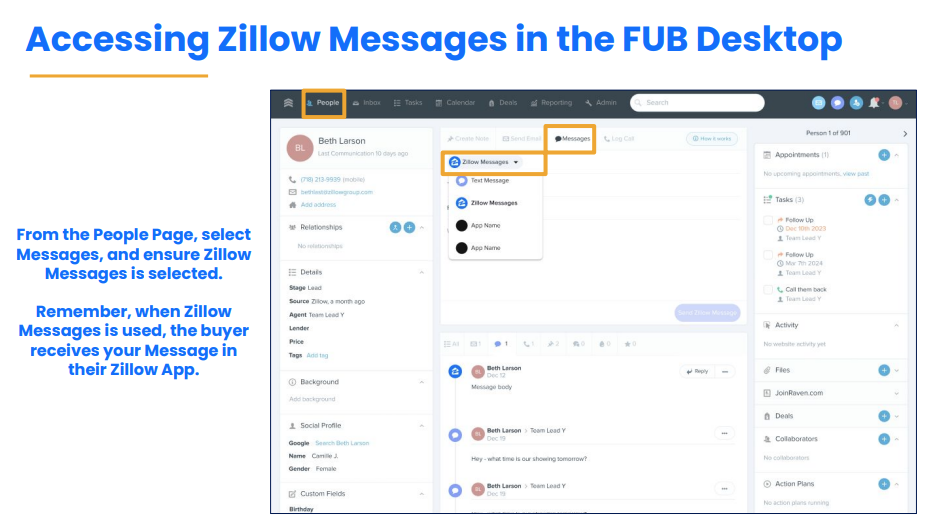
You can view or send Zillow Messages directly from your client’s lead profile or by going through your FUB Inbox. To send a Zillow Message from your client’s lead profile, click on “Messages” and make sure you have “Zillow Messages” selected (it will be selected by default) before you start typing your message.
On FUB mobile, you can view or send Zillow Messages through:
- Your notifications center
- The client’s lead profile
- Your FUB Inbox
You can differentiate between texts & Zillow Messages by referring to the icon next to the message. Zillow Messages will have a Zillow icon to the left of the message.
When you reply to the message from the buyer as a Zillow Message in FUB, they will receive your message as a push notification from their Zillow app, if enabled (screen 1), and a text message notification (screen 2). They can click to open the message on their Zillow app (screen 3) and reply from there (screen 4), or they can simply reply to the text message notification, and you will get that response as a Zillow Message in FUB.
Send a Zillow Message to reply to messages from your My Agent connections
You will also receive messages from your My Agent connections as Zillow Messages in FUB. The buyer’s message will include a link to the specific property they messaged about, so you have the right context, and from there, you can also click to view the property details before responding.
Introduce the Zillow Home Loans loan officer via Zillow Messages
When buyers are interested and ready, agents can introduce them to a Zillow Home Loans loan officer through a group message through Zillow Messages in FUB. This new feature brings a more integrated way to connect buyers, agents, and loan officers, all within a single, trackable conversation thread. To learn more, check out Group introductions via Zillow Messages for buyers and Zillow Home Loans loan officers.
Please note: Zillow Messages automatically updates the last communication filter.
For more information about how to use Zillow Messages in FUB, take this short Zillow Academy course.
FAQs
Buyer leads that come from tour requests and property inquiries will have a Zillow Message conversation started automatically.
We recommend sending your first message to the buyer through Zillow Messages in FUB and continuing the conversation until it makes sense to move to FUB text messages or FUB phone calls later on.
At this time, Zillow Messages is not supported for seller leads or profile leads.